 Match Rugby
Support
We aim to respond to every support request within two business days.
In development. Match Rugby has not yet been released on the App Store. The answers below apply to pre-release builds and will apply to the released app.
Contact us
Email support@matchrugby.app with:
- a description of the issue and roughly when it happened
- the devices involved and their iOS, iPadOS or watchOS versions
- the app version, shown on the About screen (the info button on the match list)
Reporting a defect
Send the steps to reproduce if you can. The in-app match log is the best supporting evidence.
What you need
- iPhone or iPad running iOS 26 or iPadOS 26, or later.
- Apple Watch (optional, for refereeing from the wrist) running watchOS 26 or later. A cellular watch is recommended; a non-cellular watch syncs when it is in range of its iPhone.
- An Apple Account signed in to iCloud, to keep your devices in sync.
Using Android? See Android.
Permissions on iPhone, iPad and Apple Watch
Match Rugby asks for the permissions below. Your health and location data stay on your devices; we never receive them. See the Privacy Policy.
-
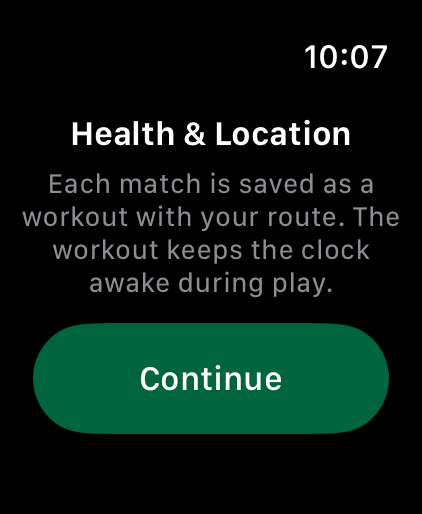
Apple Watch: Health and Location
Asked: the first time you open the watch app.
Used for: saving each match as a workout with your route. The running workout also keeps the app awake on your wrist during play.
Change it: for Health, open the Health app on the paired iPhone → Sharing → Apps → Match Rugby. For Location, open Settings on the paired iPhone → Privacy & Security → Location Services → Match Rugby. -
iPhone and iPad: Notifications
Asked: the first time you time or score a live match on that device.
Used for: match alarms when the app is not on screen: the end of a period, the end of a break, and a sanctioned player due back.
Change it: Settings → Notifications → Match Rugby. -
iPhone and iPad: Health (read only)
Asked: the first time you open a completed match.
Used for: the performance report, built from the workout your watch recorded.
Change it: Health app → Sharing → Apps → Match Rugby.
Troubleshooting on iPhone, iPad and Apple Watch
My devices aren't staying in sync
Match Rugby syncs through your iCloud account. Make sure every device is signed in to the same Apple Account, iCloud Drive is on, and the devices have a network path (Wi-Fi or cellular). Devices catch up automatically when they come back into coverage. A non-cellular Apple Watch syncs when it is in range of its iPhone.
My Apple Watch isn't recording a workout
The watch records a workout alongside each match once Health access is granted. It asks the first time you open the watch app: tap Continue, turn the categories on, and continue to the end of the sheet. If the screen dims or you back out before the last step, the request is recorded as declined.
If access was declined, the watch shows "Health access off" and does not ask again. Open the Health app on the paired iPhone → Sharing → Apps → Match Rugby, and tap Turn On All. Workouts and Workout Routes are the two that allow recording. The watch picks up the change the next time you raise your wrist with the app open.
After deleting and reinstalling the app, Health may keep the earlier answer and the sheet may not appear. The same steps fix it.
The watch face froze or the clock stopped updating during a match
This happens when no workout is running. watchOS can pause an app when you lower your wrist unless it is recording a workout, so the face shows the time it had when it paused, and haptic cues stop. The match time is not lost: it is worked out from the recorded start and stop times, and the face catches up when the app wakes. To prevent it, give the watch Health access as described in My Apple Watch isn't recording a workout.
My workout has no route map
The route needs Location access for Match Rugby and Workout Routes turned on in Health. Check Settings on the paired iPhone → Privacy & Security → Location Services → Match Rugby, and the Health app → Sharing → Apps → Match Rugby. A match with no GPS signal, such as one played indoors, is saved without a route.
I'm not getting match alarms
Match alarms are notifications on iPhone and iPad for the end of a period, the end of a break, and a sanctioned player due back. They are set only for a live match, and only on a device that is timing or scoring it. If notifications are off, the match list shows "Alarms off". Turn them on in Settings → Notifications → Match Rugby. Apple Watch uses haptic cues on the wrist in place of notifications.
I can't see a performance report
The performance report appears on a completed match when the Apple Watch recorded a workout for that match and Match Rugby may read Health data on the device you are using (Health app → Sharing → Apps → Match Rugby). The workout may take a few minutes to reach the iPhone after full time. On iPad it appears only when Health is syncing through iCloud on both the iPhone and the iPad (Settings → your name → iCloud → Health).
Android
The Android app is in development and is not yet available. Its requirements, permissions and troubleshooting will be added here when it is released. Until then, email us with any question.
Your data
Match data is stored on your devices and in your own iCloud. Workout data is stored in Apple Health. We cannot read either. To remove match data, delete the app's data from iCloud (Settings → your name → iCloud) or delete the app. The Privacy Policy has the full detail.
Organisation
Match Rugby Pty Ltd · ABN 37 702 979 146
52 O'Connell Street, Parramatta NSW 2150, Australia
support@matchrugby.app